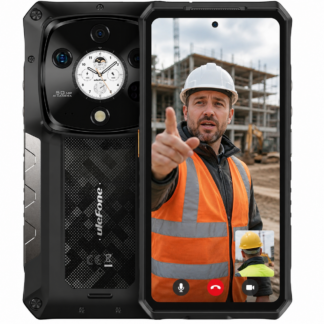
A cracked screen halfway through a shift is not a minor inconvenience when your mobile carries job sheets, maps, photos, safety messages and customer calls. That is why Ulefone Australia searches should start with a harder question than, “Which model is cheapest?” The right rugged phone needs to work on your network, suit the conditions you face, and be backed by support worth having when something goes wrong.
Ulefone has built its name around large batteries, reinforced housings and feature sets that make sense beyond the office. Some models add night vision, thermal imaging, 5G or very large displays. Those are useful tools in the right hands, but a spec sheet alone does not make a phone fit for site work, a ute tray, a cattle station or a mine roster.
Ulefone Australia: Buy for the Work, Not the Hype
Rugged phones are often marketed with dramatic drops, water sprays and oversized battery claims. The basics matter, but they are only the starting point. A phone can carry an IP rating and still be the wrong choice if its network bands are unsuitable, its screen is awkward in gloves, or local warranty support is vague.
Start with the job the device must do. A field supervisor may need a bright, readable display, reliable GPS and a camera that records clear evidence in poor weather. A farmer may put battery life, loud speakers and dual SIM capability ahead of a thin body or high-end gaming performance. A technician inspecting electrical equipment may get real value from thermal imaging, while someone working night shifts may be better served by infrared night vision.
This is where buyers can waste money by buying the most loaded model available. Thermal cameras cost more and have limits on resolution and measurement accuracy. Night vision is excellent for seeing in darkness at short-to-medium range, but it is not a replacement for a proper work light or a professional security system. Buy the feature when it solves a regular problem, not because it looks impressive in a product video.
Battery capacity is another good example. A large battery can keep a Ulefone running for days rather than hours, particularly when reception is poor and the screen is used heavily. The trade-off is weight. If the phone will live in a vehicle cradle, tool bag or jacket pocket, that may not matter. If you carry it in work trousers all day, a huge battery and thick case can become tiresome quickly.
Check Australian Network Compatibility First
Do not assume that an imported rugged mobile will work properly in Australia because it powers on and shows 4G or 5G. Network compatibility is more complicated than that. Australian carriers use different frequency bands, and their 3G network closures have made proper 4G and VoLTE support far more important.
A suitable Ulefone model should support the bands required by your chosen carrier and be compatible with its calling arrangements. This is particularly serious for regional and remote workers. A mobile that works acceptably in a metro suburb can perform poorly once you are out past the last major town, where band support and antenna performance matter more.
Before buying, confirm the specific model variant, not just the product family name. Manufacturers sometimes produce regional versions with different bands. Check your carrier, whether you rely on Telstra, Optus or Vodafone coverage, and whether the phone supports the required 4G calling features. If a seller cannot give a straight answer about the exact variant they supply, treat that as a warning sign.
No rugged phone can create coverage where there is none. For work beyond normal mobile range, consider your communications plan separately. That could mean a vehicle-mounted solution, UHF radio, a satellite device or a dedicated emergency beacon. A tough mobile is valuable gear, but it should not be mistaken for a remote-area safety system.
Water resistance is not a licence to be careless
IP68 or IP69K ratings are useful indicators of a phone’s resistance to dust and water. They do not mean every form of damage is covered, forever, under every condition. Seals wear, charging-port covers need to be closed properly, and impact damage can compromise protection even when the glass appears intact.
The same applies to drop claims and military-style testing. A reinforced frame, raised screen edges and corner protection are worthwhile because they improve the odds after a fall onto concrete or gravel. But repeated impacts, vibration on machinery and heat inside a vehicle can still shorten the life of any electronic device.
Use a screen protector and a case if one is available for the model. That may sound excessive on a rugged phone, but it is cheaper than replacing a display. Keep charging ports clear of mud and metal filings, and do not leave the mobile baking on the dash. Practical care is not babying the device. It is protecting equipment you depend on.
What Separates a Worthwhile Ulefone From a Cheap Import
The lowest advertised price is rarely the full cost of ownership. A bargain device can become expensive when it has the wrong network configuration, no realistic repair path, an unusable warranty process or a battery that cannot be serviced. For a worker who loses access to maps, job apps and two-factor authentication, downtime is part of the price too.
Quality control matters in this category. Rugged phones are more complex than their thick housings suggest. Their waterproofing depends on correctly fitted seals. Their charging systems need to cope with regular use. Their cameras, buttons, fingerprint sensors and USB ports need to work after months of dust, vibration and wet weather. Factory selection and proper testing are not glamorous selling points, but they are exactly what separate dependable equipment from rubbish.
Look closely at warranty terms before you pay. Find out who handles the claim in Australia, what proof is required, whether accidental damage is covered, and whether screen replacement is available. A warranty that requires you to ship a phone overseas at your cost can be difficult to use when you need the device back for work.
Rugged Phones Australia takes the specialist approach here: stock the models worth considering, rather than burying buyers under dozens of near-identical cheap imports. That matters because a curated range gives you a better chance of getting the right network variant, practical advice and support after the sale.
Choose the screen, camera and controls for real conditions
A large screen is excellent for reading plans, filling in forms and using mapping software. It is less convenient one-handed and more exposed during a fall. Smaller phones are easier to carry but can be frustrating when wearing gloves or trying to view detailed drawings. There is no universal winner.
For cameras, megapixels are only one part of the story. Good autofocus, usable low-light performance and quick shutter response often matter more when documenting damaged equipment or a completed job. If your work involves inspection, check whether the model has the lens and software functions you will actually use, rather than assuming every multi-camera setup delivers professional results.
Physical buttons can be a major advantage in wet or gloved conditions. A programmable key may be useful for push-to-talk, a torch, scanning app or camera. Check button placement, especially if the phone will be mounted in a vehicle or used with a belt holster. Small design details become obvious after a long day in the rain.
Set Up Your Phone Before It Goes to Work
Once you have chosen the right Ulefone, take ten minutes to prepare it properly. Install updates while you have stable Wi-Fi, set up a strong screen lock and enable device tracking. Test calls, mobile data, GPS and Bluetooth before taking it to a remote job. If it supports dual SIM, make sure the correct service is assigned for calls and data.
Set up automatic photo backup if job images need to be retained, but be realistic about data use in the bush. Download offline maps for areas with patchy coverage. Add emergency contacts, configure any work apps, and test the torch, camera and charging lead you will actually carry. A phone that has never been tested with your vehicle charger is not ready for a long run.
The best rugged mobile is not the one with the longest specification list. It is the one that stays connected, survives your normal abuse, and can be repaired or supported without weeks of arguing. Choose your Ulefone for the conditions you genuinely work in, then look after it like the essential bit of kit it is.