A dropped call from a job site is frustrating. A dropped call when a loader is down, a contractor is overdue or a storm is moving in is a different problem altogether. This remote worker connectivity guide is for Australians who work where phone reception is patchy, power is limited and a fragile consumer mobile has no place in the ute.
The hard truth is that no mobile can create coverage where no network exists. A better phone helps, but reliable communication comes from getting the whole setup right: carrier coverage, handset bands, antenna options, power planning and a backup method for genuine blackspots.
Remote Worker Connectivity Guide: Start With the Network
Do not buy a mobile based on a coverage map alone. Maps are useful planning tools, not a promise that your phone will work beside every creek bed, behind every ridge or inside every shed. Terrain, trees, weather, building materials and tower congestion all change the result.
Start with the carrier used by the people you need to contact most. On a farm, that may be the network used by contractors and family. On a mine or construction project, it may be the provider specified by site management. In remote Australia, carrier choice can matter more than the difference between two otherwise capable phones.
Check the exact places your crew works, not just the nearest town. Look at access roads, paddocks, drill sites, workshops, accommodation and common travel routes. Ask locals what works in practice. They will usually give you a more useful answer than a glossy map.
A phone must also support the Australian frequency bands used by your chosen provider. This is where cheap grey imports catch people out. They may look similar on paper, yet lack critical 4G or 5G bands, have poor carrier compatibility or receive limited local support. A rugged device is only useful if it can connect to the network you pay for.
4G still matters in the bush
5G is valuable where it is available, particularly for sending large files, video calls and using cloud-based job systems. But do not treat 5G as the only measure of a remote work phone. In many regional and remote areas, 4G remains the practical working network, while 3G shutdown changes continue to expose devices that were never properly prepared for Australian networks.
Prioritise dependable 4G coverage, voice calling compatibility and supported network bands first. Treat 5G as a worthwhile extra where your actual work area can use it.
Choose a Mobile That Can Hold a Signal
A rugged phone cannot override physics, but handset design does affect real-world performance. Good antenna design, supported frequency bands and quality internal components can make the difference between a usable marginal signal and a phone that continually searches for service.
Avoid treating every rugged-looking device as equal. Some are built around old platforms, weak radio hardware or cut-price components. They may claim waterproofing, massive batteries and impressive camera numbers, then fall short where workers actually need them: calling, messaging, GPS and network stability.
For hard-use work, look beyond the headline specification. A worthwhile device should have credible Australian network compatibility, current software support, a battery sized for long shifts and a body that can handle dust, vibration, rain and knocks. Repairability matters too. A cheap phone that becomes rubbish after one damaged screen is not economical.
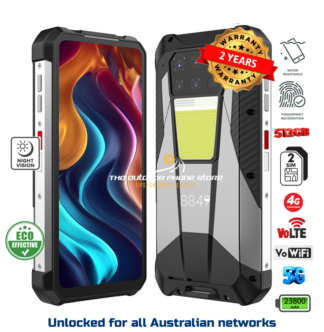
Rugged Phones Australia takes a selective approach for this reason. The aim is not to stock every tough-looking handset available. It is to filter out the poor factory variants and focus on devices that are fit for real work, with local support when something needs sorting out.
Build Redundancy Into the Setup
If your mobile is the only communication tool on site, you have already accepted too much risk. Connectivity planning should account for flat batteries, damaged devices, network outages and the simple fact that one carrier may work while another does not.
Dual SIM capability is useful for many remote workers. It lets you carry services from two different networks in one handset, switching data or calls when the primary service is weak. It is not magic – both networks can still disappear in a true blackspot – but it can significantly improve options along regional roads and across changing work areas.
Keep in mind that dual SIM arrangements vary. Some phones allow two physical SIMs, while others use a physical SIM plus eSIM. Some reduce 5G availability when both SIMs are active. Before setting up a fleet, confirm how the specific phone manages calling, data and standby service.
For crews operating beyond mobile coverage, use a separate satellite communication solution. Satellite messengers, satellite phones and vehicle-based systems all have a role, depending on the task and risk level. They also have limitations: a clear view of the sky is often needed, subscription costs apply and emergency functions are not a substitute for a proper communications plan.
Use Vehicle Antennas Where They Make Sense
A vehicle antenna can help when you spend long hours on the road or work from a fixed vehicle position. In fringe coverage, lifting the antenna above the vehicle and using external hardware designed for the job may provide a better result than relying on a phone sitting in the cup holder.
But be realistic about what an antenna can and cannot do. A passive cradle antenna, a powered signal booster and a dedicated in-vehicle modem are different products with different outcomes. Poorly installed or non-compliant signal equipment can cause interference, so do not buy random gear online and hope for the best.
For some operations, the smarter setup is a rugged phone for the worker, plus a properly installed vehicle communication system for the ute or truck. The phone handles day-to-day calls, photos, navigation and job apps. The vehicle system supports connectivity during travel or when staff are stationed well away from the office.
Consider Wi-Fi calling at base
Many rural homes, depots and site offices have decent fixed internet even where mobile reception indoors is poor. Wi-Fi calling can allow compatible mobiles to make and receive normal calls through the available internet connection. It is particularly useful in steel sheds, transportable buildings and homes with thick walls.
It depends on your carrier, plan and device support, so test it before relying on it. Also remember that Wi-Fi calling does nothing once the power or internet service is down. A backup power source for your modem and router is worthwhile if communications at base are business-critical.
Battery Power Is Part of Connectivity
A phone with an enormous battery is not automatically the best choice, but a phone that is dead by smoko is no use to a remote worker. Battery capacity needs to match the workload: constant GPS, Bluetooth accessories, photos, mapping, hotspot use and weak-signal searching all consume power quickly.
In marginal reception, mobiles work harder to maintain contact with the network. That means a phone can drain faster precisely when you need it most. Carry a quality power bank, charge from the vehicle safely and keep spare leads protected from dust and damage. For multi-day work, consider a charging routine as seriously as fuel, water and first-aid supplies.
Do not overlook heat. Leaving any mobile on the dash under the Australian sun is a good way to shorten battery life, trigger thermal shutdown or damage the device. Store it out of direct sunlight and use a secure mount that keeps controls visible without turning the phone into a hotplate.
Set Up the Phone Before It Goes to Site
Most connectivity failures are not dramatic hardware faults. They are basic setup problems discovered when the worker is 200 kilometres from the nearest shop. Configure every work mobile before deployment.
Make sure operating system updates are complete while reliable Wi-Fi is available. Confirm the correct access point settings for the SIM, test voice calls and SMS, and download offline maps for normal work areas. Set emergency contacts, medical information and location-sharing procedures where appropriate for the business.
For teams, standardise the essentials. Use the same charging cables where possible, label devices clearly and keep a written record of SIM numbers, PINs and support contacts. A simple checklist prevents a lot of wasted time when a phone is handed to a new starter at 5 am.
Also test the features you actually intend to use. If a worker needs push-to-talk, barcode scanning, thermal imaging, night vision or a hotspot for a field tablet, test it in the field. A feature that works at a desk may behave differently with gloves on, dust in the air and a weak mobile signal.
Match the Plan to the Work
The cheapest mobile plan is rarely the cheapest operational choice. Data limits matter when workers upload inspection photos, use live mapping or tether laptops. International roaming matters for cross-border travel. Call diversion, voicemail access and account controls matter for supervisors trying to keep a dispersed crew reachable.
Review usage after the first few months. If a worker routinely burns through data because they use their phone as a hotspot, provide the right plan or a dedicated data device. If the business pays for a premium service that never sees coverage in the relevant area, change it. Connectivity should be managed from evidence, not assumptions.
The right setup is rarely one expensive phone and a hopeful attitude. It is a compatible rugged mobile, the right carrier or carriers, reliable power and a second communication path when the work goes beyond network coverage. Get those basics sorted before the next job takes you out of town, because that is when connectivity stops being a feature and becomes part of getting everyone home safely.