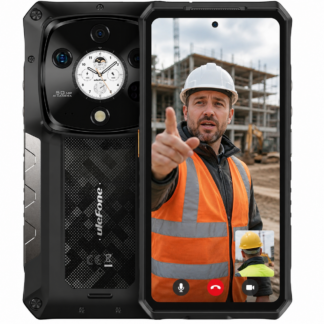
A rugged phone can survive rain, concrete dust and a drop from the ute, but it still needs software support to stay useful. Rugged Android updates affect security, app compatibility, network performance and how long a phone remains fit for work. For anyone buying mobiles for a crew, a farm, a mine site or remote work, this is not a minor spec buried under battery capacity and IP ratings.
The hard truth is that Android updates vary widely between manufacturers and models. A cheap imported device may look convincing on a spec sheet, then receive one patch and be forgotten. That is poor value, regardless of how tough the housing appears. A properly chosen rugged phone needs capable hardware, local network suitability and an update path that makes sense for its intended working life.
What Rugged Android Updates Actually Include
When sellers talk about updates, they can mean two very different things. Android version upgrades move a device from one major version of Android to another. Security patches address known vulnerabilities and system issues within the version already installed. Both matter, but not equally in every situation.
A major Android upgrade can bring improved permissions, better battery management, new accessibility features and longer compatibility with current apps. It is useful, particularly for a phone that will be kept for several years. But security patches are the day-to-day protection that matters most for devices handling work emails, job photos, maps, banking, customer details or company logins.
There are also firmware updates. These can improve camera behaviour, GPS accuracy, charging stability, Bluetooth performance, fingerprint readers and mobile network operation. On a rugged handset, firmware work can be especially valuable because these phones often carry specialist hardware such as thermal cameras, night vision sensors, programmable buttons, high-powered torches or two-way radio features.
Not every update is exciting. That is fine. The best update is often the one nobody notices because the phone continues connecting, charging and running the required apps without creating trouble on site.
Why Update Support Matters in the Field
A damaged phone is obvious. A phone with outdated software can be a quieter problem, right up until an app stops working, a security issue appears or staff cannot sign in to a required service. The cost is not just replacing the handset. It can mean missed paperwork, lost location data, delays in the field and calls to the office when people should be getting on with the job.
Many workplace apps gradually increase their Android requirements. Mapping tools, fleet systems, authentication apps, accounting platforms and communication services may eventually stop supporting older Android versions. That does not mean every older phone suddenly becomes useless, but it should change how you judge the purchase price.
A handset bought for basic calls, SMS, photographs and offline navigation has different needs from one managing sensitive data all day. It depends on the role. A simple durable feature phone or restricted-use device may not need the same software lifecycle as a supervisor’s Android handset. A field tablet used for inspection records, however, should be treated more like business equipment than a disposable mobile.
Security also matters more than some buyers assume. Public Wi-Fi at motels, shared workshop networks and phishing messages do not care whether the target is an office worker or a fitter in the Pilbara. A current security patch cannot prevent every mistake, but it reduces exposure to known weaknesses that criminals are already looking to exploit.
Do Not Confuse Android Version With Quality
The newest Android version printed in a listing is not proof that a device is the better buy. Some factories rush out a phone with the latest software, then provide little meaningful support after launch. Others sell a model on a mature Android version but issue practical firmware fixes and security updates over time.
Buyers should look beyond the version number and ask sensible questions: when was the model released, is the brand still actively supporting it, and is there a realistic history of updates for comparable devices? Also ask whether updates are delivered over the air or require manual installation. For a phone fleet spread across rural Australia, an over-the-air update process is far easier to manage.
There is a trade-off here. Newer models generally have a longer runway for Android upgrades, but a newly released device can also have early software quirks. Established hardware with proven network performance and resolved bugs may be the safer operational choice. The right answer depends on whether you need maximum lifecycle, specialist features or a phone that has already earned its keep in the field.
Check Network Compatibility Before Updating
Australia’s mobile network changes have made compatibility more serious than it used to be. The 3G shutdown exposed plenty of handsets that could technically connect to 4G yet could not reliably make emergency calls or support the voice requirements of Australian carriers. No software update can turn unsuitable radio hardware into a properly compatible local phone.
Before buying, confirm that the exact model and variant suits the network you plan to use. This matters with rugged Android phones because global models can differ in supported frequency bands, carrier settings and voice calling behaviour. It is not enough for a listing to say 4G or 5G.
Updates can improve modem behaviour and network stability, but buyers should not rely on future software promises to fix a poor compatibility decision. Start with a properly selected Australian-suitable handset, then keep its software current. That is the sensible order.
A Practical Policy for Company Phones
If you manage several devices, updates should be part of the handover process, not something left to chance. Set up each phone on Wi-Fi, install available system and app updates, test calls and data, then record the model, IMEI and Android version. It takes little time and gives you a clean baseline when an issue turns up later.
For critical phones, avoid pushing an update onto every device the minute it appears. Install it on one or two units first, particularly where staff rely on a specialised work app, Bluetooth scanner, vehicle dock or external camera. Confirm that calling, GPS, charging and essential apps behave normally before rolling it out more broadly.
Four habits prevent most update headaches:
- Keep enough free storage available for system downloads and installation.
- Use Wi-Fi and adequate battery charge rather than updating halfway through a shift.
- Back up work photographs, contacts and essential files before a major Android upgrade.
- Train staff not to ignore repeated update notices indefinitely, especially on phones used for work accounts.
This is not about turning every worker into an IT manager. It is about treating a work phone like the tool it is. You would not send someone out with a flat radio battery or a cracked safety visor. An unpatched phone carrying company access deserves the same basic discipline.
Questions to Ask Before You Buy
A seller should be able to explain the software position without hand-waving. Ask which Android version ships with the device, whether security patches have been released for the model, and what support has looked like for previous devices from that manufacturer. Be wary of vague claims such as “latest Android” with no mention of ongoing support.
Also ask about local warranty handling. Software faults are not always simple. A failed update, boot loop, battery drain or modem issue can require proper diagnosis. Buying from a specialist that understands rugged hardware is safer than buying an unknown marketplace listing where support ends once the parcel arrives.
At Rugged Phones Australia, the focus is not on filling a catalogue with every cheap tough-looking handset available. It is on selecting devices that make practical sense for Australian users, including the features, build quality and support that hold up after the initial purchase.
A rugged mobile should earn its place over years of wet weather, dust, vibration and long shifts. Choose one with an update record that suits the job, keep it maintained, and you will be far less likely to find out the hard way that a bargain phone was only cheap at the checkout.